











Privacy Upgrade: Chrome on Android Now Lets You Mask Your Precise Location
In a major win for user privacy, Google has rolled out a significant update to the Chrome browser on Android. As reported by TechCrunch on May 7, 2026, users can now choose to share their “Approximate” location instead of their “Precise” coordinates when a website requests their position. This feature mirrors a long-standing privacy setting in the Android OS, but its integration directly into the browser represents a new layer of protection for web surfing.
1. Precise vs. Approximate: What’s the Difference?
Before this update, granting a website location permission usually meant giving it your exact GPS coordinates—often accurate within a few meters.
-
Precise Location: Uses GPS, Wi-Fi, and cellular data to pinpoint exactly where you are (e.g., “123 Main St, Apartment 4B”).
-
Approximate Location: Provides a generalized area using “fuzzing” techniques, typically accurate to within about 3 square kilometers (e.g., “Somewhere in the Downtown district”).
2. Why This Matters for Your Privacy
Most websites don’t actually need to know exactly which room you are sitting in to provide their services.
-
Contextual Utility: A weather site or a local news outlet only needs to know your city or neighborhood to be useful.
-
Reducing Data Footprint: By sharing an approximate location, you prevent ad-trackers and data brokers from building a highly detailed “lifestyle profile” of your movements and habits.
-
Security: Masking your exact location adds a layer of safety against malicious sites that might attempt to harvest sensitive home or work addresses.
3. How the New Interface Works
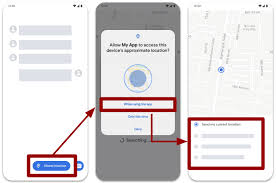
When a website now triggers a location request in Chrome for Android, you will see a redesigned permission prompt:
-
The Toggle: You will be presented with a visual map or toggle allowing you to switch between a “Precise” icon (a target) and an “Approximate” icon (a wide circle).
-
Remembering Preferences: Chrome will remember your choice for that specific site. You can always go back into “Site Settings” to upgrade or downgrade the precision later.
-
Developer Impact: Websites can still request “High Accuracy,” but the final decision now rests entirely with the user via the browser UI.
4. Part of the “Privacy Sandbox” Evolution
This update is part of Google’s broader 2026 initiative to make the mobile web more private without breaking essential functionalities.
-
Permissions Fatigue: Google is also testing “permission quietening” to prevent sites from repeatedly badgering users for location access if they have already denied it once.
-
Platform Consistency: This move brings Chrome for Android in line with how iOS and the core Android OS handle app permissions, creating a more uniform privacy experience across the entire mobile device.